Coming to the App Store: Report a Load to DEFRA From the Weighbridge
A heads up on the WasteLinks iPhone app for receiving sites: log a load in under a minute, work with no signal, and control who on your team can do what.
This is a heads up rather than a launch. The WasteLinks app for receiving sites is finished and with Apple, and this is what it does when it lands. Everything described here already works on the website today, so nothing waits on the app.
From 1 October 2026, every permitted site in England has to report each load of waste it receives to DEFRA's Digital Waste Tracking Service by the end of the second working day after it arrives. That is a duty that lands at the gate, not in the office, and the gate is rarely where the computer is. The WasteLinks app for receiving sites exists for that reason. It puts the whole reporting job on the phone already in your pocket, so a load can be recorded while the lorry is still on the weighbridge rather than from a pile of tickets someone types up on Friday afternoon.
This is a guide to what the app does, what it needs before it can file anything on your behalf, who on your team can do what, and what happens when your yard has no signal at all.
What the app is for
The app covers the receiving side of digital waste tracking. When a load arrives, you record what came in, who brought it, and what it weighed. WasteLinks builds that into the format DEFRA requires and submits it under your own permit through our approved connection. The reference DEFRA hands back is stored against the record, so when somebody asks for an audit trail months later you are producing an export rather than hunting through a portal.
It is the same account as the website, so anything logged on the phone appears on the desktop immediately and the other way round. Nobody has to choose one or the other, and there is nothing to reconcile between them.
Our connection to DEFRA has passed their production approval testing, which is the technical assessment a provider goes through before it is allowed to submit against the live service at all. Records are filed under your permit, through that approved connection.
Logging a load takes under a minute
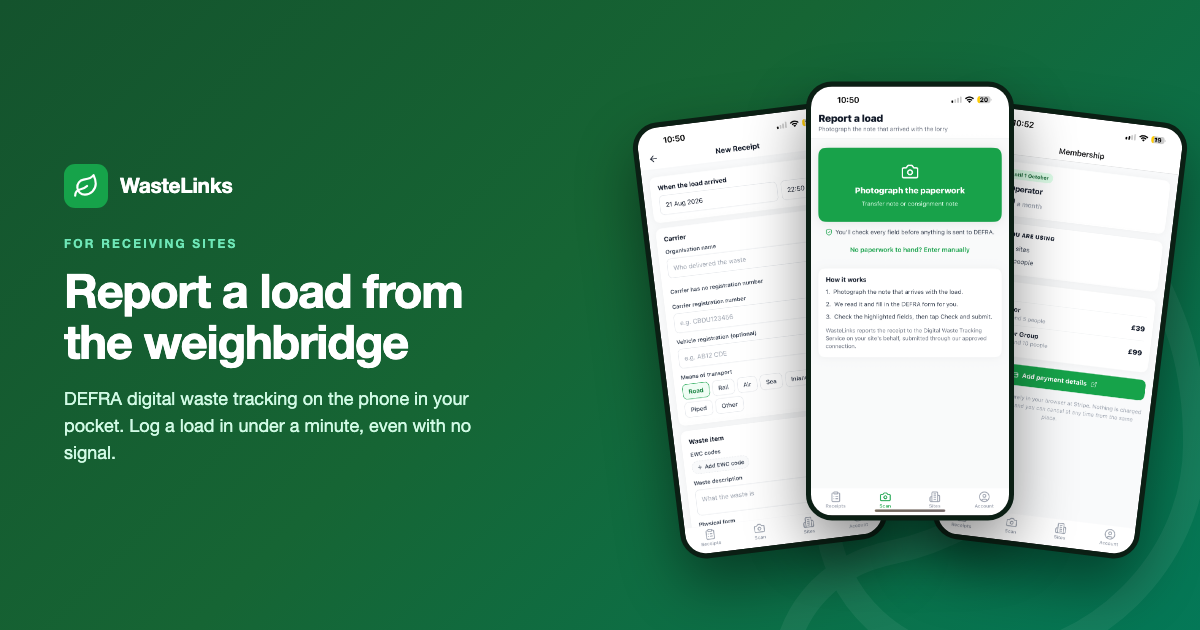
The form asks for the things DEFRA asks for and nothing else. When the load arrived, the carrier who brought it and their registration, the vehicle, and then the waste itself, described by its EWC code with a weight and a container type. Hazardous loads ask for the extra detail the regulations require, including the consignment note code, and the form only shows those fields when they actually apply, so a skip of mixed builders waste does not walk you through hazardous properties it will never have.
Every EWC code in the UK List of Waste is searchable inside the app, so nobody needs to keep a laminated sheet by the weighbridge.
Once a load is logged you can either save it as a draft and come back to it, or send it to DEFRA there and then. The receipts list shows everything the site has taken in, with the reporting deadline counting down on anything not yet sent, so a record cannot quietly go past its two working days without somebody seeing it.
When there is no signal
Weighbridges are often the worst connected place on a site. Quarries sit in cuttings, transfer stations sit behind steel sheds, and the moment a load is on the plate is exactly the moment you need to record it.
The app assumes that will happen. If there is no usable connection when you save, the load is kept on the phone and you are told so plainly. It sends itself as soon as you have signal again, whether that is when you walk back to the office or the next morning when the phone finds the yard wifi. You can see how many loads are waiting, and send them by hand if you would rather not wait.
The important detail is that the reporting clock runs from the time you recorded the load, not from the time it eventually reached us, so working offline never costs you any of your two working days. And a load that is retried can never turn into two records at DEFRA, because every load carries an identifier created on your phone the moment you first record it, and our system recognises a repeat as the same lorry rather than a new one.
Photographing the paperwork
If the carrier hands over a transfer note, you can photograph it instead of typing it out. The app reads what it can from the ticket and fills the form in, then marks the fields it is less confident about so a person checks them before anything is sent. It is there to save typing, not to replace the judgement of whoever is standing at the gate, and nothing is submitted to DEFRA until somebody has looked at it and pressed send.
What has to be set up before anything can be filed
Two things, and both are done once.
The first is your site. Its name, its address and the permit number it operates under. That takes about a minute and it has to exist before a load can be recorded against it, because a receipt is the record of waste arriving somewhere specific.
The second is the piece most operators have not met yet. DEFRA issues every site its own Digital Waste Tracking identifier from your own account with them, and that identifier is what allows us to file records under your permit rather than ours. It is a copy and paste once you have it. Until it is in place, loads you log are saved safely against your site but nothing goes to DEFRA, and the app says so rather than letting you assume otherwise. If you have not set up your DEFRA account yet, that is completely normal at this stage, and we will walk you through where the code lives.
Who on your team can do what
Most sites have more than one person at the gate, so the account is built for a team rather than a single login. You invite colleagues by email and they get their own account under your company.
The distinction is deliberately simple. Anyone you invite can do the job they were invited for, which is logging loads, correcting them and looking at what has been sent. The things that change what the company is registered as doing or what it owes are kept to the account owner. That means adding sites, linking a site to DEFRA, running the Companies House check, inviting or removing people, and anything to do with the membership and the card.
The reasoning is that a yard supervisor should be able to record a lorry at seven in the morning without anyone unlocking anything for them, but should not be able to change the DEFRA connection or the billing while doing it.
Correcting something you have already sent
Mistakes happen at a busy gate, and the regulations expect you to put them right rather than leave them. If a weight or a code was wrong on a load already filed, you can amend the record from the phone. DEFRA keeps the original and receives your correction as an update against the same tracking reference, so the history stays intact and the current position is accurate.
Everything else on the app
The receipts list filters by site, by status, by whether the load was hazardous, and by a date range, which is what most people reach for at month end. You can export what you are looking at as a spreadsheet from the phone and send it straight to whoever asked for it.
Your membership sits in the app too, including which plan you are on and how many sites and people it covers, and you can move up a tier or cancel from there. Support tickets are in the same place, so a question raised on the phone is the same conversation as one raised on the website.
When you can get it
The app is with Apple now and will be on the App Store shortly. It is built for iPhone first, and an Android version follows.
There is nothing to wait for in the meantime. Set your account up at wastelinks.co.uk today, add your site, link it to DEFRA and start logging loads from any browser. When the app arrives you sign in with the same details and everything is already there. We will let you know the day it lands.
What it costs
The Site Operator plan is thirty nine pounds a month and covers up to three sites and five people, with no commission on anything. Groups running more sites move up a tier. It is free to use between now and 1 October 2026, which is deliberately the run up to the duty rather than the aftermath, so you can log real loads and know your way around it before the day you are first legally required to get it right. Cancel any time.
Frequently Asked Questions
Does the WasteLinks app work without an internet connection?
Yes. If there is no usable connection when you save a load, it is kept on the phone and sent automatically as soon as signal returns. The reporting deadline runs from the time you recorded the load, so working offline does not use up any of your two working days.
Can the app submit waste receipts to DEFRA?
Yes. WasteLinks submits through a connection that has passed DEFRA's production approval testing, filed under your own permit rather than ours. Before that can happen your site needs the Digital Waste Tracking identifier DEFRA issues to you, which you paste in once.
Who can link a site to DEFRA?
Only the account owner. Colleagues you invite can log loads, correct them and see what has been sent, but linking the DEFRA connection, adding sites, inviting people and anything to do with billing stays with the owner.
Can I correct a receipt after it has gone to DEFRA?
Yes. You can amend a filed record from the app. DEFRA keeps the original and receives your correction as an update to the same tracking reference.
Do I have to use the app, or can I use the website?
Either, and both. It is one account, so a load logged at the weighbridge on a phone is on the desktop straight away, and nothing needs reconciling between them.
What does it cost and when does it start being charged?
Thirty nine pounds a month for up to three sites and five people, with larger groups on a higher tier. It is free to use until 1 October 2026, when the receiving site duty begins, and you can cancel at any time.
Ready to get started with WasteLinks?
Book a verified carrier, list your services, or report your waste receipts to DEFRA.